Wi-Fi 7 for Business: Should You Upgrade Yet?
IT Club — Powered by Altitude IT (opens in a new tab)

Keep up with IT Club
Add IT Club as a preferred source in Google Search.
Wi-Fi 7 adds greater wireless capacity, Multi-Link Operation and better use of 6 GHz spectrum. Whether it benefits your business depends on client devices, switching, cabling, access-point design and internet connectivity. This guide helps you decide whether to upgrade now, wait for the next refresh, or fix a different bottleneck entirely.
Quick Decision
Consider Wi-Fi 7 when you are replacing an ageing network, have genuine wireless congestion or are deploying compatible modern devices. If Wi-Fi 6 or Wi-Fi 6E is working well, the specification number alone is not a reason to upgrade.
- Check access-point placement, coverage and the actual source of the bottleneck first.
- Confirm client devices can use the features you are buying.
- Budget for switches, cabling, PoE, internet connectivity and multi-gigabit uplinks.
- Compare a planned Wi-Fi 7 refresh with improving the existing network.
A new Wi-Fi generation is available. Wi-Fi 7 access points are on sale. Product descriptions quote headline throughput figures that are substantially larger than the numbers on your current equipment.
Before reaching for the purchase order, it is worth asking a more useful question than 'Is Wi-Fi 7 faster?'
Wi-Fi 7 can remove a wireless bottleneck. It cannot remove bottlenecks elsewhere in the network.
Wi-Fi 7 is a new generation of Wi-Fi technology. It is not a new internet service. This article explains what it actually changes, what equipment is required to realise those changes and when a business genuinely benefits from upgrading.
Last checked: 7 August 2026. Verify current UK spectrum rules, Wi-Fi Alliance certification details and device availability before making purchasing decisions.
The Quick Answer
Should your business upgrade to Wi-Fi 7?
Wi-Fi 7 can provide substantially more wireless capacity and flexibility than previous Wi-Fi generations, particularly where compatible devices can use 6 GHz and features such as Multi-Link Operation.
But most businesses should not replace a working Wi-Fi 6 or Wi-Fi 6E network simply to obtain a higher specification number.
A Wi-Fi 7 upgrade makes most sense where:
- The existing network is due for replacement
- Wireless congestion is a genuine problem
- Many modern devices are being deployed
- Low latency matters for the work being done
- Very high local network throughput matters
- Dense user environments exist
- Multi-gigabit network infrastructure is already planned
- The business expects the wireless network to remain in service for several years
Before upgrading, check: broadband, switches, Ethernet cabling, PoE capability, current access points, device compatibility, building coverage and UK 6 GHz availability.
Do not buy Wi-Fi 7 to solve a problem caused by poor broadband, bad access-point placement or inadequate cabling.
What Wi-Fi 7 Actually Is
Wi-Fi 7 is the commercial name associated with the IEEE 802.11be wireless standard. It follows a progression of earlier Wi-Fi generations:
| Commercial name | IEEE standard | Spectrum |
|---|---|---|
| Wi-Fi 5 | 802.11ac | 2.4 GHz and 5 GHz |
| Wi-Fi 6 | 802.11ax | 2.4 GHz and 5 GHz |
| Wi-Fi 6E | 802.11ax extended | 2.4 GHz, 5 GHz and 6 GHz |
| Wi-Fi 7 | 802.11be | 2.4 GHz, 5 GHz and 6 GHz |
Wi-Fi 7 can operate across supported portions of 2.4 GHz, 5 GHz and 6 GHz spectrum, subject to device capability, access-point capability and national spectrum rules. The Wi-Fi Alliance offers certification under the Wi-Fi CERTIFIED 7 programme. Not every product labelled Wi-Fi 7 will carry full certification, and not every Wi-Fi 7 product supports every optional Wi-Fi 7 feature.
Wi-Fi 7 is a new generation of Wi-Fi technology. It is not a new internet service.
Wi-Fi 6 vs Wi-Fi 6E vs Wi-Fi 7
The three most relevant generations for businesses upgrading today:
| Generation | Standard | Key characteristics |
|---|---|---|
| Wi-Fi 6 | 802.11ax | 2.4 GHz and 5 GHz operation. Efficient performance in busy networks. Improved OFDMA and MU-MIMO over Wi-Fi 5. Strong choice for most business environments. |
| Wi-Fi 6E | 802.11ax extended | Adds 6 GHz spectrum where national regulation permits. Access to additional, less congested channels. Compatible clients required to benefit from 6 GHz. |
| Wi-Fi 7 | 802.11be | Adds 320 MHz channels, Multi-Link Operation, 4K QAM, Multi-RU and enhanced puncturing. Improved throughput potential, latency and spectrum flexibility. Requires compatible clients for full benefit. |
Wi-Fi 6E added spectrum. Wi-Fi 7 changes how devices can use that spectrum as well.
Feature support varies by device, access point, chipset, certification level and regulatory region. A Wi-Fi 7 access point does not automatically enable all Wi-Fi 7 features for all connecting devices.
The Main Wi-Fi 7 Improvements
Wi-Fi 7 introduces several technical improvements over Wi-Fi 6 and Wi-Fi 6E. The most significant for business environments are:
- Multi-Link Operation — coordinated use of multiple wireless links or bands simultaneously
- 320 MHz channels — wider channel widths in the 6 GHz band
- 4K QAM (4096-QAM) — higher-density modulation for more data per transmission
- Multi-RU — improved allocation of spectrum resources across multiple clients
- Enhanced preamble puncturing — better use of partially congested spectrum
- Higher theoretical throughput potential
- Improved latency potential in supported configurations
The business significance of each improvement depends on the specific network environment, client devices and workloads involved.
What Multi-Link Operation Means
Traditional Wi-Fi normally establishes communication through one wireless link at a time. A device connected to the 5 GHz band is using only that band for that session.
Multi-Link Operation can allow compatible Wi-Fi 7 devices to make coordinated use of multiple links or bands. Instead of having one road available for traffic, a compatible device may be able to make coordinated use of more than one route.
Potential benefits may include:
- Increased throughput where multiple bands are available
- Reduced latency — traffic can be sent on the fastest available link
- Improved resilience — if one band is congested, another may be used
- Better use of available spectrum across 2.4 GHz, 5 GHz and 6 GHz simultaneously
MLO may be one of Wi-Fi 7's most important business improvements because it is about using wireless capacity more intelligently — not merely quoting a bigger speed number.
MLO implementations differ across products. Not every Wi-Fi 7 device or access point implements MLO in the same way, and the benefit depends on both the access point and the client supporting compatible MLO modes. Do not expect doubled speed, zero latency or identical support across every Wi-Fi 7 product.
Why 320 MHz Channels Matter
Wi-Fi channels occupy blocks of radio spectrum. Wider channels can carry more data in a single transmission. Wi-Fi 7 can support channel widths up to 320 MHz where suitable spectrum and regulation allow.
A wider channel is like widening a road. It can carry more traffic, but only where enough space exists to build it without causing problems elsewhere.
In practice, 320 MHz channels require the 6 GHz band, where sufficient contiguous spectrum may be available. Potential limitations include:
- Available spectrum — 320 MHz requires the 6 GHz band
- Neighbouring networks — wider channels may overlap other users' spectrum
- Interference — broader channels are exposed to a wider range of interference
- Regulatory region — UK spectrum rules determine what is permitted
- Access-point design — not all products support 320 MHz
- Client support — the connecting device must also support the channel width
- Channel reuse in multi-AP deployments
Do not assume every UK Wi-Fi 7 deployment will routinely use 320 MHz channels. The actual channel width used depends on the environment, the access point, the client and the applicable spectrum rules.
What 4K QAM Means
Wi-Fi 7 can use 4096-QAM, commonly called 4K QAM, in suitable radio conditions. Modulation determines how much data is encoded into each wireless transmission — higher-order modulation encodes more data per symbol, increasing the potential data rate.
The practical limitation is signal quality. Higher-order modulation requires a strong, clean signal to decode reliably. Therefore:
- 4K QAM works best when a device is close to the access point
- Signal quality must be consistently high
- Users further from the AP, or in areas with interference, will use lower modulation rates
- Maximum modulation rates should not be expected throughout an entire building
The fastest Wi-Fi modes usually depend on the best radio conditions.
Multi-RU and Puncturing
Wireless spectrum can become partially occupied by interference or by another network sharing the same channel. In earlier Wi-Fi generations, this could force a device to abandon a wider channel even if most of it was clear.
Wi-Fi 7 improves how access points and clients can use available pieces of spectrum. Multi-RU allows resources to be allocated more flexibly across clients within a channel. Enhanced preamble puncturing allows a device to work around occupied sub-channels rather than abandoning the wider channel entirely.
The practical benefit is better performance in congested or partially interference-affected environments — which describes many real-world office buildings.
Why 6 GHz Matters
The 6 GHz band offers significant potential advantages over 2.4 GHz and 5 GHz:
- Additional spectrum — more channels available
- More room for wide channels, including 80, 160 and potentially 320 MHz
- Less legacy-device congestion — older Wi-Fi 4 and Wi-Fi 5 devices do not operate in 6 GHz
- Potentially cleaner radio conditions in environments where 2.4 GHz and 5 GHz are congested
But 6 GHz also has an important physical limitation:
6 GHz can give you more capacity. It does not magically give you more coverage.
Higher-frequency radio signals attenuate more rapidly. They penetrate walls and building materials less effectively than lower-frequency signals. A 6 GHz wireless network may therefore require more access points to achieve comparable coverage to a 5 GHz network in the same building.
Organisations upgrading from older Wi-Fi cannot assume existing access-point positions remain ideal for 6 GHz. A coverage survey is advisable before committing to a design.
The UK 6 GHz Position
UK spectrum rules are set by Ofcom. They differ in important respects from some other regulatory regions. Do not rely on US product reviews or US spectrum availability when assessing what is permitted in the UK.
Wi-Fi 7 hardware may support more spectrum than UK regulation currently allows it to use in a particular mode.
The current UK position on 6 GHz spectrum (verify with Ofcom before making purchasing or deployment decisions):
| Band | Current UK position |
|---|---|
| Lower 6 GHz — 5925–6425 MHz | Ofcom made this band available for licence-exempt wireless LAN (RLAN) use from 2020, subject to the applicable technical conditions. Suitable for indoor low-power indoor access points meeting the relevant requirements. |
| Upper 6 GHz — 6425–7125 MHz | Ofcom announced further decisions in July 2026 establishing a spectrum-sharing framework. This includes a Wi-Fi priority portion (approximately 6425–6585 MHz) and a mobile priority portion (approximately 6585–7125 MHz), with provisions for licence-exempt Wi-Fi and AFC-controlled access in certain scenarios. Verify precisely what has legally come into force and under what technical conditions. |
Clearly distinguish between what Ofcom has decided in principle, what is in force as regulation and what remains subject to consultation. These are not the same thing.
AFC — Automated Frequency Coordination — is a mechanism that may be required for some higher-power or outdoor 6 GHz Wi-Fi use. An AFC system provides real-time spectrum coordination to avoid interference with other spectrum users. Check the current UK AFC position before planning any deployment that may require it.
Last checked: 7 August 2026. Verify current UK spectrum rules at Ofcom's official website before deployment.
Does Wi-Fi 7 Mean Faster Internet?
Myth vs Fact
Myth: Install Wi-Fi 7 and the internet becomes faster.
Fact: Internet speed remains limited by the broadband or leased-line connection.
If the business internet connection is 500 Mbit/s, replacing Wi-Fi capable of 1 Gbit/s with Wi-Fi capable of several gigabits does not make the 500 Mbit/s internet circuit deliver several gigabits.
The speed on the Wi-Fi box and the speed of your internet connection are two different numbers.
Wi-Fi 7 may still improve aspects of internet use including:
- Contention — more clients sharing the wireless network may experience less collision and delay
- Latency — reduced wireless latency can improve responsiveness for interactive applications
- Local transfers — moving files within the network benefits directly from faster wireless
- Consistency — more stable wireless connections reduce retransmission and jitter
- Capacity — more simultaneous users may be supported without degradation
But the WAN circuit remains a separate and independent bottleneck.
Does Your Laptop or Phone Support It?
Wi-Fi 7 requires Wi-Fi 7 client devices to realise its full capabilities. A Wi-Fi 7 access point does not upgrade an older laptop or phone into a Wi-Fi 7 client.
Older devices continue to connect through their native Wi-Fi generation. A Wi-Fi 7 access point will serve Wi-Fi 5, Wi-Fi 6 and Wi-Fi 6E devices using backward compatibility, but those older devices will not benefit from features such as MLO or 320 MHz channels.
A Wi-Fi 7 network produces the greatest benefit when the devices connecting to it can actually use the new capabilities.
Review your device inventory before committing to an upgrade:
- Laptops — check Wi-Fi generation and 6 GHz support
- Smartphones — check Wi-Fi generation and 6 GHz support
- Tablets — check Wi-Fi generation
- Meeting-room systems — check Wi-Fi generation
- Printers and scanners — often Wi-Fi 5 or older
- IoT devices — frequently Wi-Fi 4 or Wi-Fi 5
- Handheld devices — may be Wi-Fi 5
- Specialist equipment — verify individually
If most devices are Wi-Fi 5 or Wi-Fi 6, the business case for Wi-Fi 7 is weaker than if a large proportion of devices already support Wi-Fi 7 or will be replaced soon.
What Happens to Older Devices?
Older Wi-Fi devices do not stop working on a Wi-Fi 7 network. Wi-Fi is designed for backward compatibility. A Wi-Fi 5 laptop will connect to a Wi-Fi 7 access point and operate at Wi-Fi 5 speeds, just as it does today.
However, a business may operate a mixed environment containing clients at different Wi-Fi generations simultaneously. This mixed environment is normal and expected. The access point manages the different client capabilities. Very old clients using older protocol modes can affect overall network efficiency.
The Hidden Wired-Network Requirements
This is the section many Wi-Fi 7 articles omit. It is often the most important part of the upgrade decision.
A modern Wi-Fi 7 access point may be capable of more aggregate wireless throughput than a traditional 1 Gbit/s Ethernet uplink can carry. Where a Wi-Fi 7 AP aggregates high wireless throughput from multiple clients, it may need a faster wired connection to the switch to avoid creating a new bottleneck.
A multi-gigabit access point connected to an old 1 Gbit/s switch may simply move the bottleneck from the air to the cable.
Depending on the AP model, client density and workloads, a Wi-Fi 7 upgrade may trigger requirements for:
- 2.5 GbE or 5 GbE access-point uplinks instead of 1 GbE
- New multi-gigabit switches
- Updated Power over Ethernet capability
- Appropriate cabling
- Faster firewall interfaces
- Faster server or storage infrastructure for local traffic
Not every Wi-Fi 7 access point requires 10 GbE. Actual requirements depend on the specific AP model, client density, workload, radio configuration, internet connection and local traffic profile. Check the manufacturer's specifications and consult a network designer.
Ethernet Backhaul
Ethernet backhaul — the wired connection between the access point and the switch — is fundamental to wireless performance. A wireless AP is only as fast as the wired link behind it allows.
| Ethernet speed | Typical scenario |
|---|---|
| 1 Gbit/s (1GbE) | Standard in most existing installations. May become a bottleneck with Wi-Fi 7 APs in high-density or high-throughput environments. |
| 2.5 Gbit/s (2.5GbE, 2.5GBASE-T) | Common uplink for mid-range Wi-Fi 7 APs. Runs on existing Cat 5e or Cat 6 at appropriate distances. |
| 5 Gbit/s (5GbE, 5GBASE-T) | Higher-end AP uplink. Requires appropriate cabling and switch ports. |
| 10 Gbit/s (10GbE, 10GBASE-T) | High-density enterprise deployments. Requires Cat 6A or appropriate infrastructure. Not typically required for ordinary business environments. |
Multi-Gigabit Switching
To provide 2.5 GbE or faster uplinks to access points, the switch must support those speeds. Many existing business switches have only 1 GbE ports. A Wi-Fi 7 upgrade may therefore require replacing or supplementing switches with multi-gigabit models.
Considerations include:
- How many access points need multi-gigabit ports?
- Does the switch fabric have adequate capacity?
- Are existing switches managed and PoE-capable?
- How many ports are needed overall?
- What is the uplink speed from the access switch to the core?
Cabling
Existing structured cabling may support multi-gigabit Ethernet, depending on the cable category, installation quality, length and condition.
| Cable category | Multi-gigabit potential |
|---|---|
| Cat 5e | May support 2.5GBASE-T over suitable distances and installation quality. Test before assuming. |
| Cat 6 | Generally supports 2.5GBASE-T and 5GBASE-T. May support 10GBASE-T over shorter distances depending on installation. |
| Cat 6A | Designed for 10GBASE-T over full channel lengths. Preferred for new-build installations where 10 GbE is planned. |
Do not rip out working cabling because the access point has a Wi-Fi 7 badge.
The practical approach: audit the existing cabling, confirm the required Ethernet rates for the planned AP models, test existing cable runs where there is doubt, check switch capability, and replace only where testing demonstrates inadequacy for the required speed.
Power over Ethernet
Most access points are powered via Power over Ethernet rather than local mains power. Higher-performance Wi-Fi 7 access points may have higher power requirements than their Wi-Fi 6 predecessors.
Before deploying, verify:
- Which PoE standard the switch supports (PoE 802.3af, PoE+ 802.3at, or PoE++ 802.3bt)
- The per-port PoE output available from the switch
- The total PoE budget across all switch ports
- The power requirements of the specific AP model in the intended operating mode
- How many access points the switch can power simultaneously within its budget
Not all Wi-Fi 7 access points require PoE++. Requirements vary by product and configuration. Check the manufacturer's specifications for the exact AP model.
The switch must provide enough data capacity and enough electrical power.
Coverage and Access-Point Placement
Wireless coverage depends on physics, not the generation number on the box. Wi-Fi 7 does not penetrate walls better than Wi-Fi 6. Access-point placement remains fundamental.
Adding 6 GHz capability may actually require more access points in some buildings. Because 6 GHz signals attenuate more quickly, the spacing between access points may need to be reduced to achieve comparable coverage to 5 GHz.
A wireless site survey before upgrading will identify:
- Current coverage gaps and signal strengths
- Interference sources and channel utilisation
- Appropriate AP positions for the planned frequency bands
- The number of access points required for the target design
- Building construction factors affecting signal propagation
Wi-Fi 7 in Busy Offices
Dense office environments — open-plan floors, hot-desk spaces, meeting rooms with many concurrent users — are where Wi-Fi 7 improvements are most likely to produce tangible business benefit. Features such as MLO, Multi-RU and enhanced puncturing can improve performance when many clients compete for spectrum simultaneously.
The 6 GHz band also helps here. Because legacy devices do not use 6 GHz, the band can provide additional clean capacity for modern Wi-Fi 7 clients without the congestion that often affects 2.4 GHz and 5 GHz in busy environments.
Wi-Fi 7 for Video Calls and Cloud Applications
Video calling and cloud applications generally require reliable, consistent connectivity rather than maximum throughput. Latency and jitter matter more than headline speed for real-time communications.
Wi-Fi 7's potential latency improvements — through MLO and better spectrum management — may benefit video call quality in congested environments. However, for most businesses using cloud services over a stable internet connection, the internet circuit is a more significant variable than the wireless standard.
Wi-Fi 7 for Local File Transfers
Local file transfers within the office network — to a NAS, a server, a backup system or between workstations — bypass the internet connection entirely. For these workloads, wireless throughput is directly relevant.
Businesses where local data movement is heavy — creative-media workflows, local backups, large CAD or design files, video editing, internal databases — may see more tangible benefit from Wi-Fi 7 than businesses whose work is primarily cloud-based. But only where the access point, client, switch, server and storage are all capable of supporting higher throughput.
Wi-Fi 7 and Guest Networks
Guest networks should remain isolated from the main business network, regardless of Wi-Fi generation. A new Wi-Fi 7 deployment is an opportunity to confirm that guest isolation is correctly configured, that VLANs are properly segmented, and that guests cannot reach internal business resources.
Guest Wi-Fi does not benefit from providing the very latest access points. Restricting guest bandwidth and keeping it on older infrastructure is often appropriate and more cost-effective.
Security Considerations
Wi-Fi 7 does not automatically improve all aspects of security. Network security depends on configuration, authentication, monitoring and lifecycle management — not the radio standard.
Relevant security considerations when deploying or upgrading Wi-Fi:
- WPA3 — use WPA3 where client support allows; WPA3 Enterprise with certificate-based authentication provides stronger security for business environments
- Firmware updates — ensure access points receive regular, managed updates throughout their lifecycle
- Administrator accounts — change default credentials, use named accounts, enable MFA on cloud-management platforms
- Management interfaces — restrict access to the AP management interface to trusted networks
- Guest isolation — verify VLANs prevent guests reaching internal systems
- IoT separation — keep IoT devices on a separate SSID and VLAN
- Rogue AP detection — use management tools that identify unauthorised access points
- Device lifecycle — plan for manufacturer support end dates before purchasing
A newer radio standard does not compensate for weak passwords, poor segmentation or abandoned firmware.
Consumer Router vs Business Wi-Fi
Consumer Wi-Fi 7 routers may have impressive headline throughput specifications. They are not automatically appropriate for business environments.
| Consumer Wi-Fi | Business Wi-Fi |
|---|---|
| Simple installation and app management | Central management console, monitoring and alerts |
| Mesh for home coverage | Multiple access points with professional roaming |
| Single SSID typical | Multiple SSIDs — staff, guest, IoT — on separate VLANs |
| Basic security settings | WPA3 Enterprise, RADIUS, identity integration |
| Home-device integration | Structured cabling, PoE, switch integration |
| Consumer support and warranty | Business support with defined response times |
| Aggressive headline speed claims | Realistic performance specifications |
| Limited logging and visibility | Logs, audit trails, security event monitoring |
| Consumer firmware lifecycle | Managed firmware updates with business lifecycle |
Business Wi-Fi is a network design decision — not a router-shopping decision.
A powerful consumer Wi-Fi 7 router does not replace a properly designed business wireless system. The management capability, security features, roaming quality and support lifecycle are different products for different purposes.
When Wi-Fi 7 Is Worth Buying
Wi-Fi 7 makes the strongest business case in the following situations:
- NEW OFFICE OR REFURBISHMENT — If the network is being built or rebuilt, installing Wi-Fi 7 infrastructure now provides better long-term capability than buying the previous generation at the end of its cycle.
- NETWORK DUE FOR REPLACEMENT — A normal replacement cycle is the ideal moment to consider upgrading to the current standard. Replacing Wi-Fi 6 equipment before it needs replacing is rarely justified, but replacing it with Wi-Fi 7 when it does need replacing is sensible.
- DENSE OFFICE — Many simultaneous users in open-plan environments benefit from better spectrum efficiency, MLO and 6 GHz availability.
- CREATIVE OR TECHNICAL WORKLOADS — Heavy local data transfers — design files, video, backups, virtualisation — may justify greater wireless capacity where the rest of the network can support it.
- MULTI-GIGABIT INTERNET — Organisations with multi-gigabit broadband or leased lines need wireless infrastructure capable of making better use of that connectivity.
- LONG EXPECTED LIFECYCLE — Equipment expected to remain deployed for five or more years benefits from starting with the current standard rather than the previous one.
- HIGH DEVICE TURNOVER — Businesses replacing laptops and phones frequently may gain a high proportion of Wi-Fi 7 clients relatively quickly, making earlier investment more justified.
When You Should Keep Wi-Fi 6
Most businesses do not need to rush a Wi-Fi 7 upgrade. The following situations generally do not justify immediate replacement:
- Wi-Fi 6 already performs well and meets current requirements
- Most devices are Wi-Fi 5 or Wi-Fi 6 and will not be replaced soon
- Broadband or the internet circuit is the actual performance bottleneck
- The building has wireless coverage problems requiring better AP placement, not better hardware
- Existing switches only support 1 GbE and will not be replaced
- Cabling needs attention before a wireless upgrade makes sense
- The wireless network is lightly used and not causing measurable problems
- Local multi-gigabit file transfers are rare
- Budget is better spent on security, backup, or infrastructure with higher priority
- The current Wi-Fi system has several years of useful life remaining
If your existing Wi-Fi is reliable and fast enough for the work being done, Wi-Fi 7 is an option for the next refresh — not an emergency purchase.
Diagnosing Your Office Wi-Fi Problem
Before deciding which wireless standard to buy, diagnose the actual problem. Buying a newer access point before identifying the bottleneck is troubleshooting with a credit card.
| Symptom | Likely location | Investigate |
|---|---|---|
| Users lose signal in specific rooms or areas | Coverage | AP positioning, wall construction, insufficient AP density |
| Wi-Fi slows when the office is busy | Capacity or congestion | Channel planning, AP density, client distribution, band steering |
| Everything becomes slow at the same time | Internet / WAN | WAN bandwidth, ISP, firewall throughput |
| Wi-Fi link is strong but local transfers are slow | Wired network | Ethernet speed, switch ports, server, storage |
| Only one device or user is affected | Client device | Wi-Fi adapter, driver, device performance |
| Slow speeds everywhere at all times | Multiple causes | Systematic review — start with internet, then wired, then wireless |
Wi-Fi Upgrade Checklist
Is your business actually ready for Wi-Fi 7?
Business need
- What specific problem is the upgrade intended to solve?
- Is the existing Wi-Fi causing measurable business problems?
- Is the network already due for its normal replacement cycle?
Client devices
- How many devices currently support Wi-Fi 7?
- How many devices support 6 GHz?
- When will laptops, phones and tablets be replaced?
Internet
- What is the contracted WAN speed?
- Is broadband currently the performance bottleneck?
Switching
- Do switches support 2.5 GbE or faster where required?
- Are sufficient multi-gigabit ports available?
- Is the switching fabric adequate for the planned traffic?
Cabling
- What cabling category is installed?
- Has it been tested for the required Ethernet rate?
- Can it support 2.5 GbE or faster to the planned APs?
Power over Ethernet
- What PoE standard does the switch support?
- Is sufficient power budget available for all planned APs?
Wireless design
- Has coverage been measured with a site survey?
- Is access-point placement appropriate for 5 GHz and 6 GHz?
- Is the level of interference understood?
Security
- Is WPA3 supported by the planned AP and key clients?
- Are guest networks correctly isolated?
- Are IoT devices on a separate SSID and VLAN?
- Is management access properly protected?
Operations
- Is central management available?
- Are firmware updates planned and managed?
- Is network monitoring configured?
- Is support ownership clear?
Lifecycle
- How long should the new network remain in service?
- Does Wi-Fi 7 provide useful future capacity for planned device adoption?
Common Buying Mistakes
- Buying based solely on the maximum headline throughput figure
- Confusing Wi-Fi speed with internet speed
- Ignoring client device compatibility before purchasing
- Assuming all Wi-Fi 7 products support all Wi-Fi 7 features equally
- Ignoring UK spectrum rules and assuming US 6 GHz availability applies
- Ignoring Ethernet backhaul requirements and switch capability
- Not checking PoE budget before specifying AP models
- Replacing existing cabling unnecessarily before testing it
- Assuming 6 GHz improves range or penetration — it reduces both
- Reducing the number of APs because Wi-Fi 7 is 'faster'
- Using consumer mesh equipment in business environments requiring management, VLANs and roaming
- Keeping an old firewall as the limiting factor after upgrading everything else
- Skipping a coverage survey before deploying new access points
- Not configuring guest-network segmentation on new equipment
- Buying without a firmware-management or lifecycle plan
- Replacing well-performing Wi-Fi 6 without a genuine business reason
Practical Business Implications
Wi-Fi 7 is real and available
Certified access points and client devices are available now. This is not a future specification — it is a current product category.
Theoretical speed is not the main business benefit
Capacity, latency, spectrum flexibility and performance in dense environments are more commercially relevant than the maximum headline figure.
MLO is important
Compatible devices may make more intelligent use of multiple wireless links simultaneously, improving throughput and reducing latency more elegantly than simply quoting a bigger speed number.
6 GHz creates capacity
The 6 GHz band provides additional spectrum and reduces congestion from legacy devices. But it has shorter useful range, which may affect access-point density and design.
UK spectrum rules matter
The UK spectrum position differs from some other markets. Verify what is currently permitted before planning a 6 GHz deployment.
Your switches may become the bottleneck
Multi-gigabit wireless may require multi-gigabit Ethernet. Check switches, cabling and PoE before committing to an access-point specification.
Your devices matter
Older client devices will not gain every new feature from a Wi-Fi 7 access point. The proportion of Wi-Fi 7-capable clients in the business affects how quickly the investment pays back.
Wi-Fi 6 remains useful
A well-designed Wi-Fi 6 installation does not suddenly become inadequate because Wi-Fi 7 is available. Network design, placement and configuration matter more than the generation number.
The IT Club View
Wi-Fi 7 is a significant improvement in wireless networking. Multi-Link Operation, wider channels, better spectrum management and 6 GHz capability are genuine advances over Wi-Fi 6 and Wi-Fi 6E.
The best Wi-Fi upgrade is the one that fixes a real network limitation — not the one with the highest number on the box.
But technology buyers should resist the usual upgrade-cycle trap: NEWER does not automatically mean NECESSARY.
IT Club recommends the following approach to any wireless upgrade decision:
- Diagnose the existing problem before choosing a solution
- Check current client devices — they determine how much benefit is realised
- Consider the normal refresh cycle — replacement time is upgrade time
- Understand UK 6 GHz availability before specifying products that depend on it
- Audit switches, cabling and PoE before committing to an AP specification
- Plan access-point density, not just access-point model
- Prioritise business-grade management, monitoring and security
- Retain working Wi-Fi 6 where it meets requirements
- Consider Wi-Fi 7 for new installations and longer lifecycle investments
If you are replacing wireless infrastructure today, Wi-Fi 7 deserves serious consideration. If your existing Wi-Fi 6 network is performing well, there is usually no business case for ripping it out simply because a newer standard exists.
Plain-English Takeaway
Wi-Fi 7 offers higher wireless capacity, wider channels, Multi-Link Operation and better use of 6 GHz spectrum, but businesses will only benefit fully when compatible devices, switching, cabling, access-point design and internet connectivity support it. Businesses installing a new network or replacing ageing Wi-Fi should consider Wi-Fi 7, while organisations with a well-performing Wi-Fi 6 or Wi-Fi 6E network usually do not need to upgrade simply because the newer standard is available.
Administrator Technical Note
Technical detail for IT leads, network administrators and advisors
This note covers technical context for experienced practitioners. Values requiring site-specific RF assessment — including AP count, transmit power, channel width and channel plan — are not published here.
IEEE 802.11be and Wi-Fi CERTIFIED 7
Wi-Fi 7 is defined in IEEE 802.11be. The Wi-Fi Alliance Wi-Fi CERTIFIED 7 programme defines mandatory certification requirements and optional features. Mandatory features include MLO (with certain modes), 320 MHz channel support in 6 GHz, 4096-QAM and Multi-RU. Feature support in certified products may differ from the full standard. Verify current certification requirements at the Wi-Fi Alliance website.
Multi-Link Operation modes
MLO includes Simultaneous Transmit and Receive (STR) and Enhanced Multi-Link Single-Radio (EMLSR) modes. STR allows simultaneous operation on multiple links where the radio design supports it. EMLSR allows a device to monitor multiple links and switch traffic between them. Implementation and capability vary significantly across chipsets and products. The benefit of MLO depends on both the access point and the client supporting compatible modes.
Spectrum and modulation
Channel widths available: 20, 40, 80, 160 and 320 MHz. The 320 MHz width requires the 6 GHz band. 4096-QAM requires Signal-to-Noise Ratio (SNR) conditions appropriate to the modulation order — typically achievable within a few metres of the AP in a good RF environment. Beyond that range, the AP and client negotiate lower modulation rates. Real-world throughput depends on modulation, coding rate, channel width, guard interval, OFDMA allocation, MU-MIMO streams and interference.
OFDMA and MU-MIMO
Orthogonal Frequency-Division Multiple Access (OFDMA) allows a channel to be sub-divided into Resource Units (RUs) serving multiple clients simultaneously in the same transmission. Multi-User MIMO (MU-MIMO) allows multiple spatial streams to different clients in the same time slot. Wi-Fi 7 improves both mechanisms and adds Multi-RU allocation, allowing more flexible assignment of sub-channel resources across clients.
Preamble puncturing
Enhanced preamble puncturing allows an AP to exclude specific 20 MHz sub-channels within a wider channel if those sub-channels are occupied by interference or another BSS. The remaining sub-channels can still be used, preserving much of the channel capacity rather than dropping to a narrower channel entirely.
RF planning considerations
6 GHz path loss is higher than 5 GHz due to the frequency-distance relationship. Effective 6 GHz range in a typical office environment may be 30–50% shorter than 5 GHz depending on building construction. AP density planning must account for this. Walls, floors, glass partitions and structural materials all affect attenuation. A predictive RF model and physical survey is required to produce a reliable design; rules-of-thumb from 5 GHz deployments are not directly applicable to 6 GHz.
UK spectrum — Lower 6 GHz
Ofcom opened 5925–6425 MHz for licence-exempt RLAN use from 2020. Low-power indoor (LPI) operation is permitted under the applicable technical rules. Verify current permitted transmit power levels, antenna limits and applicable Interface Requirements at the Ofcom website before deploying.
UK spectrum — Upper 6 GHz
Ofcom announced decisions in July 2026 establishing a sharing framework for the 6425–7125 MHz band, including a Wi-Fi priority portion and a mobile priority portion. AFC-controlled access may apply in certain scenarios. The legal implementation status of specific elements should be verified before planning any deployment that depends on Upper 6 GHz availability. The AFC system coordinates spectrum use between services in real time.
Ethernet and switching
2.5GBASE-T and 5GBASE-T (NBASE-T standards) allow multi-gigabit Ethernet over existing structured cabling that meets the relevant performance requirements for the cable category and length. 10GBASE-T requires Cat 6A for full-length channels. Test existing cabling with a certification tester before assuming multi-gigabit capability. Switch fabric capacity and PoE power budget must both be assessed before specifying infrastructure.
Security architecture
WPA3 in Personal mode provides Simultaneous Authentication of Equals (SAE) replacing PSK handshake. WPA3 Enterprise provides 192-bit security suite option and certificate-based authentication via 802.1X and RADIUS. RADIUS integration allows user identity to be used for wireless authentication, supporting per-user policy, VLAN assignment and accounting. Guest SSIDs should be isolated at Layer 2 and Layer 3 from staff traffic. IoT devices on a separate SSID and VLAN reduce the risk of lateral movement. Rogue AP detection requires central management visibility across all APs. Management plane access should be restricted to a dedicated management VLAN or network segment.
Roaming
Fast BSS transition (802.11r), pre-authentication and OKC (Opportunistic Key Caching) reduce roaming handoff time between APs. 802.11k provides neighbour AP reports to assist client-side roaming decisions. 802.11v BSS Transition Management allows the AP to suggest a better AP to a client. Not all clients implement these mechanisms equally. Test roaming behaviour with representative client devices, particularly for latency-sensitive applications such as VoIP and video conferencing.
Operational Heartbeat
Wireless environments change constantly. Staff numbers change. Neighbouring Wi-Fi networks change. Devices are replaced. Firmware updates arrive. Applications consume more bandwidth. APs fail. Switches are upgraded. Internet circuits change. Security requirements evolve. New spectrum becomes available. Offices are rearranged.
Business Wi-Fi needs an Operational Heartbeat: access points, client demand, interference, firmware, switching, internet capacity and recurring user problems should be reviewed rather than assumed to remain adequate.
A recurring network review should check:
- Access-point health — are all APs online, connected and performing?
- Firmware — are APs running current supported firmware?
- Client count — has the number of connected devices changed significantly?
- Channel utilisation — is spectrum congestion increasing?
- Interference — have new interference sources appeared?
- Coverage problems — are users reporting signal issues in specific areas?
- Internet utilisation — is the WAN circuit approaching capacity?
- Switch utilisation — are any ports or uplinks saturated?
- PoE capacity — is the power budget approaching its limit?
- Guest networks — are they correctly isolated?
- VLAN configuration — is segmentation correct and current?
- Security — are WPA standards and access controls current?
- Unsupported equipment — are any APs approaching end of support?
- User complaints — have recurring wireless issues been reported?
- Corrective actions — have previous issues been resolved?
- Next review date — has it been set and ownership assigned?
Related Business Questions
38 questions business owners are asking — with plain-English answers
What is Wi-Fi 7?
Wi-Fi 7 is the commercial name for wireless networking based on the IEEE 802.11be standard. It follows Wi-Fi 6 and Wi-Fi 6E, adding features including Multi-Link Operation, 320 MHz channels and 4K QAM.
Is Wi-Fi 7 available now?
Yes. Wi-Fi 7 access points and Wi-Fi 7 client devices are available as commercial products. Wi-Fi Alliance certification under the Wi-Fi CERTIFIED 7 programme is active.
What does 802.11be mean?
802.11be is the IEEE standard on which Wi-Fi 7 is based. IEEE 802.11 is the family of wireless networking standards. The suffix 'be' identifies the specific generation, as 'ax' identifies Wi-Fi 6 and Wi-Fi 6E.
Is Wi-Fi 7 faster than Wi-Fi 6?
Wi-Fi 7 has higher theoretical throughput than Wi-Fi 6. Whether a business sees faster real-world performance depends on client devices, spectrum availability, network design and the rest of the infrastructure.
What is Wi-Fi 6E?
Wi-Fi 6E extends the 802.11ax standard into the 6 GHz band. It uses the same underlying technology as Wi-Fi 6 but gains access to additional spectrum where national regulation permits.
What is the difference between Wi-Fi 6E and Wi-Fi 7?
Wi-Fi 6E adds 6 GHz spectrum to Wi-Fi 6 technology. Wi-Fi 7 is a new generation (802.11be) that also uses 6 GHz but adds further improvements including Multi-Link Operation, 320 MHz channels and 4K QAM.
Does Wi-Fi 7 use 6 GHz?
Yes, subject to device capability and national spectrum rules. Wi-Fi 7 can operate in 2.4 GHz, 5 GHz and 6 GHz.
Is 6 GHz available in the UK?
Ofcom opened the Lower 6 GHz band (5925–6425 MHz) for licence-exempt wireless LAN use from 2020. Ofcom announced further decisions on the Upper 6 GHz band in July 2026. Verify current rules at the Ofcom website before deployment. Last checked: 7 August 2026.
What has Ofcom changed about 6 GHz?
Ofcom has opened the Lower 6 GHz band and, through July 2026 decisions, established a sharing framework for the Upper 6 GHz band. Check the Ofcom website for the current regulatory position before making deployment decisions.
What is Upper 6 GHz?
The Upper 6 GHz band refers to frequencies above 6425 MHz, extending to 7125 MHz. In the UK, Ofcom's July 2026 decisions established a framework for sharing this spectrum between Wi-Fi and mobile services.
What is AFC?
Automated Frequency Coordination is a system that can be required for certain 6 GHz Wi-Fi use cases. An AFC database provides real-time information on which frequencies can be used without causing interference to other spectrum users.
What is Multi-Link Operation?
Multi-Link Operation allows compatible Wi-Fi 7 devices to make coordinated use of multiple wireless links or bands simultaneously. This can increase throughput, reduce latency and improve resilience to interference.
What is MLO?
MLO is the abbreviation for Multi-Link Operation. Both the access point and the client must support compatible MLO modes for the feature to work.
What are 320 MHz Wi-Fi channels?
Channel width determines how much spectrum a wireless connection uses. Wider channels can carry more data. Wi-Fi 7 supports 320 MHz channels in the 6 GHz band where sufficient spectrum and regulatory conditions allow.
Can UK Wi-Fi 7 use 320 MHz channels?
This depends on the specific spectrum availability, regulatory conditions and access-point configuration. 320 MHz channels require the 6 GHz band. Verify what channel widths are permitted under current UK spectrum rules for the applicable spectrum and power mode.
What is 4K QAM?
4K QAM (4096-QAM) is a modulation scheme that encodes more data into each wireless transmission than the 1024-QAM used in Wi-Fi 6. It requires strong signal conditions and works best close to the access point.
What is Multi-RU?
Multi-Resource Unit allocation allows access points to assign multiple sub-channel resources to a single client simultaneously, improving spectrum utilisation efficiency in busy networks.
What is Wi-Fi puncturing?
Preamble puncturing allows an access point to exclude occupied or interfered sub-channels within a wider channel, using the remaining sub-channels instead of falling back to a narrower channel width entirely.
Does Wi-Fi 7 improve range?
No. Range depends on transmit power, frequency, building construction and antenna design — not the Wi-Fi generation. Wi-Fi 7 does not penetrate walls better than Wi-Fi 6.
Does 6 GHz travel through walls?
6 GHz signals attenuate more rapidly than 5 GHz signals and penetrate walls less effectively. The 6 GHz band provides more capacity but shorter useful range.
Will Wi-Fi 7 make my broadband faster?
No. Broadband speed is determined by the internet circuit from your ISP. Wi-Fi 7 improves the wireless network between devices and the router. Those are two different things.
Will older devices work on Wi-Fi 7?
Yes. Wi-Fi is backward compatible. Wi-Fi 5 and Wi-Fi 6 devices will connect to a Wi-Fi 7 access point using their native Wi-Fi generation. They will not gain Wi-Fi 7 features.
Does my laptop support Wi-Fi 7?
Check the laptop's Wi-Fi adapter specification. Wi-Fi 7 was introduced in consumer laptops from 2024 onwards. Laptops purchased before that period are unlikely to support Wi-Fi 7.
Does my phone support Wi-Fi 7?
Check the phone's specification. Flagship smartphones released from 2024 onwards are more likely to include Wi-Fi 7. Mid-range and budget devices vary. Check the manufacturer's specification page.
Do businesses need 2.5 GbE for Wi-Fi 7?
It depends on the access-point model and network workload. Many Wi-Fi 7 APs use 2.5 GbE uplinks. If the switch only has 1 GbE ports, the wired connection may become a bottleneck. Check AP specifications.
Does Wi-Fi 7 require 10 GbE?
Not for most business deployments. 10 GbE uplinks are used in high-density enterprise environments. Many business Wi-Fi 7 access points use 2.5 GbE or 5 GbE. Check the specific AP model's specification.
Does Wi-Fi 7 require new cabling?
Not automatically. Existing Cat 5e or Cat 6 cabling may support the required multi-gigabit Ethernet speeds depending on cable category, length and installation quality. Test existing cable runs before replacing them.
Will Cat 5e work with Wi-Fi 7?
Cat 5e may support 2.5GBASE-T over suitable distances and installation quality. Test the existing cabling with a certification tester before assuming it will support the required speed.
Do I need Cat 6A?
Cat 6A is the preferred choice for new structured cabling installations where 10 GbE is planned. For most business Wi-Fi 7 deployments using 2.5 GbE or 5 GbE uplinks, existing Cat 5e or Cat 6 may be sufficient after testing.
Does Wi-Fi 7 require PoE++?
Not all Wi-Fi 7 access points require PoE++. Power requirements vary by product and operating mode. Check the specific AP model's power requirements and compare with the switch's PoE standard and budget.
Should a business use mesh Wi-Fi?
Mesh Wi-Fi can be appropriate for some business environments, particularly small offices. Larger or more complex environments benefit from wired-backhaul access points with professional management, VLANs and roaming. The choice depends on the environment and requirements.
Is consumer mesh suitable for an office?
Consumer mesh products may lack the central management, VLAN support, roaming quality, security features and firmware lifecycle that business environments require. They may be appropriate for very small offices with simple requirements, but not as a universal solution.
Is Wi-Fi 7 more secure?
Wi-Fi 7 supports WPA3 and related security improvements. But security also depends on configuration, firmware management, authentication design and monitoring. A Wi-Fi 7 access point with poor configuration is not more secure than a well-configured Wi-Fi 6 system.
Does Wi-Fi 7 require WPA3?
WPA3 is recommended and supported by Wi-Fi 7 equipment. Whether WPA3 is required depends on your security policy and the capability of client devices. WPA3 Enterprise with 802.1X is recommended for business environments.
Should I replace Wi-Fi 6 with Wi-Fi 7?
If your Wi-Fi 6 is performing well and not due for replacement, there is usually no compelling business case for an immediate upgrade. Consider Wi-Fi 7 at the next normal replacement cycle.
Should a new office install Wi-Fi 7?
Yes, generally. If you are building a new network, installing current-generation equipment provides better long-term capability and lifecycle. Wi-Fi 7 is the appropriate choice for new infrastructure designed to remain in service for several years.
How many access points does an office need?
There is no universal answer. AP count depends on office size, layout, wall construction, user density, frequency bands used, coverage targets and application requirements. A wireless site survey is the only reliable way to determine the correct design.
Why is my office Wi-Fi slow?
Common causes include: slow internet circuit; poor AP placement; too few APs; interference; congested channels; old client devices; a slow wired network behind the AP; or a mix of these. Diagnose the bottleneck before buying new equipment.
How do I know whether Wi-Fi or broadband is the problem?
Test internet speed on a wired connection to the router. If the wired speed is significantly lower than the contracted service, the problem is likely the broadband. If wired speed is good but wireless is slow, the wireless network is more likely the bottleneck.
Can IT Club help assess a Wi-Fi upgrade proposal?
Yes. Ask the IT Club Advisor about your current wireless setup, a proposal you have received, or whether your business is likely to benefit from a Wi-Fi 7 upgrade.
Not sure whether Wi-Fi 7 would actually improve your network?
Ask the IT Club Advisor about Wi-Fi 6, Wi-Fi 6E, Wi-Fi 7, access points, cabling, switching, coverage or a wireless upgrade proposal you have received.
Free to ask. No credit card. No sales pressure. Fair usage applies.
Business Wi-Fi Upgrade Checklist — Knowledge Centre →
Choosing an IT Support Company in Manchester: A Buyer’s Guide →
Choosing an IT Support Company in Bristol: A Buyer’s Guide →
Choosing an IT Support Company in London: A Buyer’s Guide →
Choosing an IT Support Company in Leeds: A Buyer’s Guide →
Choosing an IT Support Company in Birmingham: A Buyer’s Guide →
Plain-English Takeaway
Wi-Fi 7 offers higher wireless capacity, wider channels, Multi-Link Operation and better use of 6 GHz spectrum, but businesses will only benefit fully when compatible devices, switching, cabling, access-point design and internet connectivity support it. Businesses installing a new network or replacing ageing Wi-Fi should consider Wi-Fi 7, while organisations with a well-performing Wi-Fi 6 or Wi-Fi 6E network usually do not need to upgrade simply because the newer standard is available.
Need the practical steps?
A short, instruction-led version of this topic is available in the Knowledge Centre.
View the Knowledge Centre Guide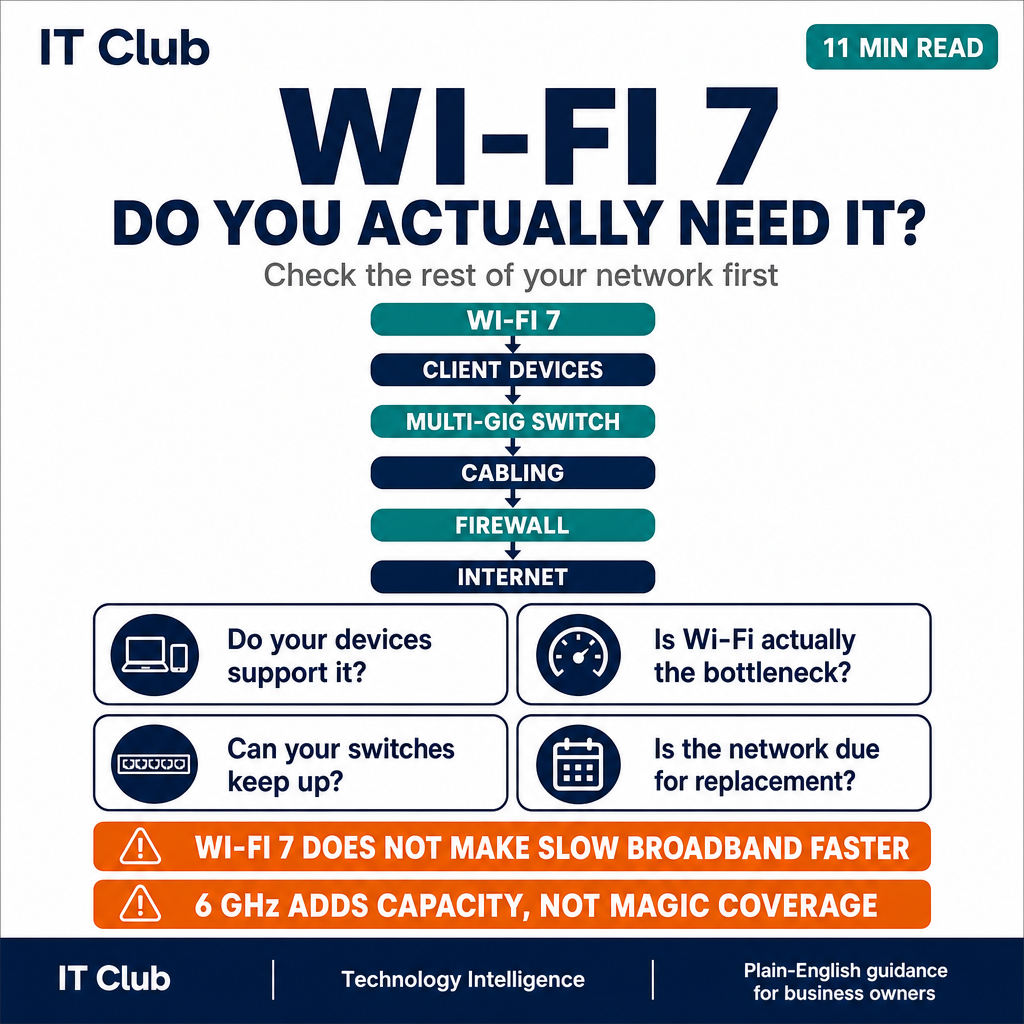
Tap to follow The IT Club Channel on WhatsApp.
Related Articles
No Mobile Signal? That Excuse May Be Disappearing
Satellite-to-phone connectivity is giving some ordinary smartphones another route to communicate when terrestrial mobile coverage is unavailable.
Read articleYour Wi-Fi Could Soon Know When Someone Is in the Room
Wi-Fi signals can be affected by movement, presence and objects in a room. This plain-English guide explains what Wi-Fi sensing can do, where it is useful and why camera-free does not mean data-free.
Read articleEssential Cisco IOS Commands for Network Configuration and Troubleshooting
A practical Cisco IOS command reference covering interfaces, VLANs, routing, SSH, ACLs, logging, configuration backup and secure administration — with security modernisation guidance throughout.
Read articleNeed help putting this into practice?
IT Club helps you understand the technology. If you need implementation, support or consultancy, the teams behind IT Club can help.
Altitude IT (opens in a new tab) — IT support, cyber security, Microsoft 365 and technology operations.
Altitude AI (opens in a new tab) — AI discovery, automation, governance and implementation.